
Showing posts with label networking. Show all posts
Showing posts with label networking. Show all posts
20 January, 2014
Wireless Router Options
The choices for good wireless router brands are shrinking. I've already sworn off Netgear and D-Link, and I just found out Cisco/Linksys had a ridiculous privacy policy for a few days in 2012 before it was reversed. Their "smart" routers had a forced firmware upgrade, which came with a privacy policy that allowed them to collect and share personal data. So: forced updates and collecting personal data. It's sad because I always thought Linksys products, although expensive, were the best. Now I don't even have a preferred basic brand.


13 January, 2014
hosts file
i.e. "How to block selected sites"
i.e. "DIY adblock"
I was wondering how to block certain sites, mainly because of pop-up ads. Is there a Firefox add-on that enables me to keep a blacklist, sort of like NoScript? It turns out, you can do this in Windows without any add-ons, and it will affect all your browsers, maybe all your programs.
How it works is the Internet really works by numbers. You can think of sites by their name, like www.google.com, but when your computer tries to visit that site, what it really needs is the site's IP address. So it first looks in a DNS server for that site's IP address. Sort of like a phone book and phone numbers. It turns out, all the major computer OSes have a local list of sites and IP addresses that it checks first. So, if you want to block any sites, just add them to the list, and give an invalid IP (usually 127.0.0.1, which means your local computer).
On Windows, the file is in \etc\ (search for the exact location for different versions of Windows). Understandably, this file is an important security issue, as it can be used to redirect sites (e.g. you think you're visiting your bank, your browser displays your bank's web address, but it's really visiting another server disguised to look like your bank. When you try to log in, the other site learns your username and password.)
One problem with Windows is the hosts file doesn't support wildcards or root domains. So redirecting doubleclick.net doesn't redirect ad.doubleclick.net, and you need to list each possible subdomain. It's hard to think of all the sites to block, so it might be easier to just get a suggested list. There's one at http://winhelp2002.mvps.org/hosts.htm. As I said, this file is a security risk, so check any file you use. I find some ads useful, so rather than copying the whole list, I only block sites I don't want. When I see an ad I don't want, I take a note of its domain and get the relevant subdomains from the list.
Update 4 Sep 15
I decided to share the sites I'm blocking. As I said, I'm ok with ads, so these are the worst of the worst. Also serves as backup for my list. Also testing embedding Google Docs.
There's also a more powerful way to do this - the hosts file only works for that computer. The thing is, you can setup a custom DNS server, and wherever you use that DNS server (e.g. set it in your router, then everything using your Wi-Fi will follow, like computers, phones, tablets, TVs, game consoles), it will take effect. I think there are custom DNS services that let you set a domain blacklist. I just have to find one.
i.e. "DIY adblock"
I was wondering how to block certain sites, mainly because of pop-up ads. Is there a Firefox add-on that enables me to keep a blacklist, sort of like NoScript? It turns out, you can do this in Windows without any add-ons, and it will affect all your browsers, maybe all your programs.
How it works is the Internet really works by numbers. You can think of sites by their name, like www.google.com, but when your computer tries to visit that site, what it really needs is the site's IP address. So it first looks in a DNS server for that site's IP address. Sort of like a phone book and phone numbers. It turns out, all the major computer OSes have a local list of sites and IP addresses that it checks first. So, if you want to block any sites, just add them to the list, and give an invalid IP (usually 127.0.0.1, which means your local computer).
On Windows, the file is in \etc\ (search for the exact location for different versions of Windows). Understandably, this file is an important security issue, as it can be used to redirect sites (e.g. you think you're visiting your bank, your browser displays your bank's web address, but it's really visiting another server disguised to look like your bank. When you try to log in, the other site learns your username and password.)
One problem with Windows is the hosts file doesn't support wildcards or root domains. So redirecting doubleclick.net doesn't redirect ad.doubleclick.net, and you need to list each possible subdomain. It's hard to think of all the sites to block, so it might be easier to just get a suggested list. There's one at http://winhelp2002.mvps.org/hosts.htm. As I said, this file is a security risk, so check any file you use. I find some ads useful, so rather than copying the whole list, I only block sites I don't want. When I see an ad I don't want, I take a note of its domain and get the relevant subdomains from the list.
Update 4 Sep 15
I decided to share the sites I'm blocking. As I said, I'm ok with ads, so these are the worst of the worst. Also serves as backup for my list. Also testing embedding Google Docs.
There's also a more powerful way to do this - the hosts file only works for that computer. The thing is, you can setup a custom DNS server, and wherever you use that DNS server (e.g. set it in your router, then everything using your Wi-Fi will follow, like computers, phones, tablets, TVs, game consoles), it will take effect. I think there are custom DNS services that let you set a domain blacklist. I just have to find one.
28 August, 2011
Internet speed upgrade
I upgraded my Internet access from 3 Mbps to 10 Mbps.
 Before
 After
After
 Connection details


16 July, 2011
Engenius ERB9250 wireless repeater
I bought this wireless repeater to extend the range of a wireless network. It's probably the easiest way - just put it at the edge of the existing coverage, it picks up and repeats everything it hears. One thing I'm wondering is whether the 802.11 standard covers repeaters, which would make them much simpler and more efficient. If not, there would be problems involved with receiving everything you sent.
To set this up, you survey wireless networks around, select yours and input the password (it only repeats for that network). You might need to tweak IP settings, since it should have a static IP and you need to make sure DHCP doesn't assign that IP to another device.
To set this up, you survey wireless networks around, select yours and input the password (it only repeats for that network). You might need to tweak IP settings, since it should have a static IP and you need to make sure DHCP doesn't assign that IP to another device.
- easy to set up
- detailed site survey (signal strength and type of encryption)
- physically compact
- does not inform you if password is wrong
- main problem is with logging in - it does that thing where it says someone else is logged in and refuses to log you in (set automatic logout to 1 minute), if you log out and try to log in again it tells you to close and re open your browser
- configuration does not work with iOS, the page keeps refreshing
- no other uses, I should have got one that can work as an Access Point (AP) as well
01 November, 2010
Firesheep
http://codebutler.github.com/firesheep/
What
A Firefox extension that demonstrates the insecurity of some web sites (including Facebook), allowing you to log on as another user on your local network.
How it works
Once you log in, these sites send you cookies to identify yourself. These cookies are sent unencrypted and anyone who intercepts them can pose as you.
I haven't fully tested it, but it seems to work. I could log into someone else's Facebook account. My network is 64-bit WEP.
What
A Firefox extension that demonstrates the insecurity of some web sites (including Facebook), allowing you to log on as another user on your local network.
How it works
Once you log in, these sites send you cookies to identify yourself. These cookies are sent unencrypted and anyone who intercepts them can pose as you.
I haven't fully tested it, but it seems to work. I could log into someone else's Facebook account. My network is 64-bit WEP.
23 October, 2010


24 July, 2010
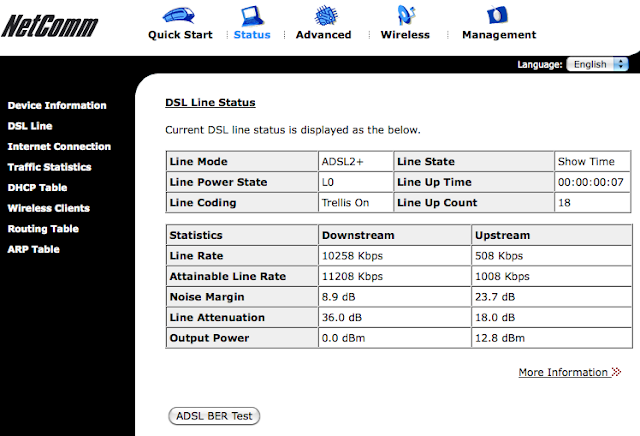
Low attainable rate on ADSL2+
Recently, our house ADSL2+ was having problems. We discovered the attainable line rate was very low, about 300 kbps. After disconnecting the microfilter, the attainable line rate recovered to 8000 kbps. I guess the filter is low quality, or there's something wrong with the extra cables. This is a screenshot of the normal noise margin and line attenuation, for future reference.


05 October, 2009
NetComm NB6plus4W
Is it that hard to make a good router? At the rate technology progresses, you'd think routers would be pretty advanced by now. All it seems is just that they're getting a bit faster (802.11g and ADSL2+) and cheaper, but nothing else.
The UI is still ridiculous. My friend bought a medium grade Netgear and it tries to use a stupid wizard everytime you log in, so instead of just typing the IP address, you have to add "basicsetting.htm". It also keeps thinking you're logged in when you aren't, asking you for the password while at the same time telling you you can't log in because someone else is already logged in. Really smooth for a router with 7 antennas.
My D-Link IP cam has a horrible web interface that only works with IE so I am loathe to get one of their routers.
Now this modem-router recommended by whirlpool.net.au we just got keeps restarting by itself and I have yet to find the reason. It seems to be something to do with the wireless.
Is it too much to ask for a router that only needs restarting once a week? Brands left to try for my next router: Linksys, Belkin.
The UI is still ridiculous. My friend bought a medium grade Netgear and it tries to use a stupid wizard everytime you log in, so instead of just typing the IP address, you have to add "basicsetting.htm". It also keeps thinking you're logged in when you aren't, asking you for the password while at the same time telling you you can't log in because someone else is already logged in. Really smooth for a router with 7 antennas.
My D-Link IP cam has a horrible web interface that only works with IE so I am loathe to get one of their routers.
Now this modem-router recommended by whirlpool.net.au we just got keeps restarting by itself and I have yet to find the reason. It seems to be something to do with the wireless.
Is it too much to ask for a router that only needs restarting once a week? Brands left to try for my next router: Linksys, Belkin.
Subscribe to:
Posts (Atom)