Showing posts with label excel. Show all posts

06 April, 2015

Tweet: Would You Like To Save Changes?

Tweet - I'm starting a new type of one-liner style posts, like tweets. Enables faster comments without having to wait for a full post.
User Interface - I'm about to comment how technology has come so far, yet UI (and battery technology) remains so so very far behind. Seriously, phones have more processing power than computers that ran Windows XP yet they struggle to accurately select text?

Here's an idea, instead of just asking people if they would like to save changes when quitting Word or Excel, how about actually showing what the changes are? Most of the time it's just because you printed it. It's stupid how I can't give Word 2 versions of the same file and have it show me what the differences are. This is trivially easy, developers. No, instead you have to "track changes" while you edit. Has nobody thought of this before?

Also on UI:
  • Long ago, links on websites used to be in blue. A bit boring, but definitely more practical than now where links are hidden within normal text. I'm talking about usernames and times being links. Did you know times on Facebook take you to a direct link to the post? Did you know "edited" takes you to previous versions of a post? More than once I've considered tabbing through a webpage to find the links.
  • Controls that only appear when you mouse over them are retarded. How do they expect you to discover them?
  • As is putting links at the bottom of auto-scroll webpages. Lots of sites now, they aren't organised into pages. When you reach the bottom, it automatically loads more, making the page longer. Example: Google image search. Makes remembering the location of things impossible but whatever. What's absolutely brainless and shows no planning is putting links at the bottom. So you scroll all the way down, see "help" "API" "settings", and before you can click on anything, the page loads and the links are pushed down. How on earth are you supposed to click on those links? Facebook used to do this but at least they've improved.
Ok this went on for longer than I expected for a tweet.

02 December, 2013

Set Up Default Chart In Excel

If you have a certain chart formatting you use often, you can set it as default. e.g. I don't like the border around the chart, and using grey as the chart background in Excel 2003 is just stupid and a waste of ink.
http://www.techrepublic.com/blog/microsoft-office/work-more-efficiently-by-changing-excels-chart-defaults/

  1. Set up a chart as you like it
  2. Click the chart, click the Design tab, Save As Template
  3. In the Insert tab, click the small arrow on the bottom right of the Charts section
  4. Click Templates in the left column, select your template and click Set as Default Chart

19 April, 2013

Extracting Text In Excel

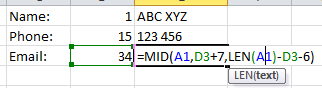
Excel is actually pretty good at managing text. Suppose you have a string of text containing markers (Name: etc.) you want to divide:
Into:

First use the function FIND to locate the markers in the string of text.

Then use the function MID to pull out text between those locations. You need to account for the length of the markers.

This is great because it doesn't depend on how long the text string is or if there are spaces, etc. For the last string you can use the function RIGHT, for the last few characters, or first use LEN to get the length of the string.

30 August, 2012

Multiple windows in Excel 2010

I found something surprising - Excel 2010 doesn't easily support multiple windows. This makes it very troublesome to compare spreadsheets.

Good explanation at http://social.technet.microsoft.com/Forums/en/office2010/thread/749983b3-ba7e-49d3-99bf-f67d70245046 (If the link doesn't work, search for "Excel 2010 files won't open in separate window")
In short, you have to manually open 2 instances of Excel and open the files individually in them. Excel is still Multiple Document Interface (MDI) (opens all documents in single window) and only simulates new Single Document Interface (SDI) by showing open documents in the Task Bar. Word is already new SDI.

08 April, 2012

Excel switch between relative and absolute references

I've always wondered how to do this, and I found out you can use F4 to cycle between relative and absolute references, e.g. A1 and $A$1!

02 March, 2011

Rearranging/reordering data series in an Excel chart/graph

 Let's say you have this graph, and you want to rearrange the legend on the right so that it goes 22 h - 4 h - ... - 0 h, so it matches the order of the curves. I couldn't find an easy way to do it on my own, so I searched and found a solution at http://www.mrexcel.com/archive/Chart/10197.html.

 Right click on any curve and select "Format Data Series"

There is an option called "Order" that lets you manually order the curves any way you like!

24 June, 2010

Two Excel tricks

These are tricks I found in Excel. I'm writing them here in case I want to use them again.
Say you have data like:

These tricks will teach you to:
  • Invert the data i.e., 55, 34, 21 ...
  • Select only even cells, odd cells, cells 3, 6, 9 ... or any pattern that can be described mathematically
Invert the data
Functions used
=ROW()
Returns the row number of the current cell. E.g.

=INDIRECT()
Returns the value in the cell referred to.
E.g.
INDIRECT("D51") returns the value in cell D51 - in this case, MBNI.
However, INDIRECT(D51) returns the value in the cell in the cell in D51. It's a bit confusing.
It jumps twice: INDIRECT(D69) → D69 contains E71 → E71 contains bounce → bounce
If D69 contained "E69", it would result in a circular formula. The best way to use this function is with the function ADDRESS.

=ADDRESS()
Converts row and column numbers into an address. E.g.
Obviously, a cell can address any other cell, not just itself.

Putting it all together
Can you see where all this is heading? If you can express the sequence of cells in a mathematical formula, you can refer to them with a combination of the above functions. To rearrange cells, we want:
Or, thinking in row and column numbers:
But that still requires a different entry for each cell. We need to represent this using each cell's row number, so we can use the same formula for each cell:
Let's check using cell B5. The current row is 5. 7-current row = 2. Compare with the previous picture, yes! We want row 2. Now all we have to do is express this in Excel language.
If you're wondering how to figure this out, start from the inside out. Look at cell B1. ROW() = 1. 7-ROW = 6. So ADDRESS becomes ADDRESS(6,1), which is A6. INDIRECT("A6") gives the value in cell A6 = 55.
If you're one step ahead, you've already realised you don't have to invert rows side by side. I can invert rows anywhere in the spreadsheet, invert columns or convert rows to columns, or even convert diagonals to rows with a bit of manipulation!

Selecting patterns of cells
Selecting cells is just an extension of the previous. Let's start with a longer list and the cells whose values we want in column B:
Make it into a formula:


I'd much appreciate other uses for these often overlooked but highly useful functions!