Showing posts with label word. Show all posts

06 April, 2015

Tweet: Would You Like To Save Changes?

Tweet - I'm starting a new type of one-liner style posts, like tweets. Enables faster comments without having to wait for a full post.
User Interface - I'm about to comment how technology has come so far, yet UI (and battery technology) remains so so very far behind. Seriously, phones have more processing power than computers that ran Windows XP yet they struggle to accurately select text?

Here's an idea, instead of just asking people if they would like to save changes when quitting Word or Excel, how about actually showing what the changes are? Most of the time it's just because you printed it. It's stupid how I can't give Word 2 versions of the same file and have it show me what the differences are. This is trivially easy, developers. No, instead you have to "track changes" while you edit. Has nobody thought of this before?

Also on UI:
  • Long ago, links on websites used to be in blue. A bit boring, but definitely more practical than now where links are hidden within normal text. I'm talking about usernames and times being links. Did you know times on Facebook take you to a direct link to the post? Did you know "edited" takes you to previous versions of a post? More than once I've considered tabbing through a webpage to find the links.
  • Controls that only appear when you mouse over them are retarded. How do they expect you to discover them?
  • As is putting links at the bottom of auto-scroll webpages. Lots of sites now, they aren't organised into pages. When you reach the bottom, it automatically loads more, making the page longer. Example: Google image search. Makes remembering the location of things impossible but whatever. What's absolutely brainless and shows no planning is putting links at the bottom. So you scroll all the way down, see "help" "API" "settings", and before you can click on anything, the page loads and the links are pushed down. How on earth are you supposed to click on those links? Facebook used to do this but at least they've improved.
Ok this went on for longer than I expected for a tweet.

20 July, 2012

Word 2010 Equation Shortcuts

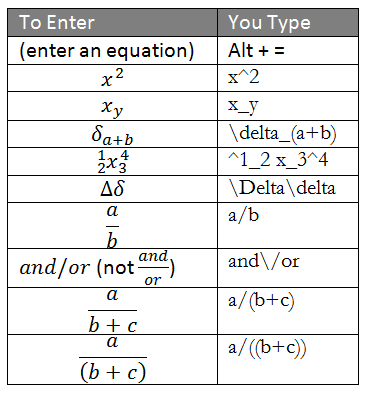
I didn't like Word 2007's equation editor at first, because unlike the old one, to input x^2 you had to click on the superscript box before typing x, which I kept forgetting and seemed unnatural (it's like reading "superscript x 2"). However, I found out Word seems to use the "Unicode Nearly Plain-Text Encoding of Mathematics" standard, which means equations are stored and can be entered as a string of text, which could make entering equations very easy!

Most of my ideas came from Linear format equations and Math AutoCorrect in Word 2010.
There are lot of other functions supported, these are the types I'm using now.

06 May, 2011

Spliced Word file

I recently tried to fix a Word file, and this is what I learnt.

By the looks of it, the file had been “spliced” with another, autorun.inf. The beginning went:
autorun]
[autorun[
autorun[
[autorun
:jmp8
open=BOOTEX\thumbcache_131.exe

Solution 1
Save the Document to Another File Format, and Then Convert It Back to Word
  1. Open file
  2. Save as: (in decreasing priority) rtf, html, other text formats, txt
  3. Close and reopen

Solution 2
Insert the Document As a File in a New Document
  1. In a new document, insert > file

Solution 3
Open the File by Linking to It
  1. Create and save a new document with sample text
  2. In a second, new document, paste special > paste link > formatted text (rtf)
  3. In the second document, edit > links
  4. Change source > select broken document

Solution 4
Use the Recover Text from Any File Converter
This one finally worked, but I found that in addition to being corrupted, the file was also unsaved, so there wasn’t much data in it anyway.
  1. File > open > change file type to recover text from any file (*.*)

References (with more solutions)
http://support.microsoft.com/kb/826864
http://support.microsoft.com/kb/290946

31 March, 2011

Fixing pages in Word

Continuing from the previous post, sometimes when you edit pages in Word, it shifts lines between pages, which may mess up your layout. Is there a way to fix the page breaks, maybe by squeezing more lines into the margins if necessary? The only way I know of is manual page breaks, but you may end up with pages with 1 line only.

Conditional line breaks in Word

I'm looking for a way to make conditional line breaks in Word. Since people come to this site for answers, not questions, I'm just making a note of this as "things to do when I have the time", rather than hoping for an answer.

Let's say you leave a line between paragraphs, like above.

When you print the page, if the first paragraph ends just at the end of the page, the next page starts with a line break:

This is the end of the first paragraph.
------------------PAGE BREAK--------------------

This is the second paragraph.

But I don't want that, I only want:

This is the end of the first paragraph.
------------------PAGE BREAK--------------------
This is the second paragraph.

But if you delete the line break and edit the document, the paragraphs may end up on the same page like this:
This is the end of the first paragraph.
This is the second paragraph.

So how can I make a line break that only exists if it's not the first line on a new page?

22 February, 2011

Section breaks in Word

If you want to have a Word document with:
  • different page orientations (portrait and landscape)
  • non-continuous page numbers
  • different margins on different pages
  • different numbers of columns
  • different headers or footers
You need to divide your document into sections. What are sections? They're divisions of the document with different properties. The way to add a section break varies greatly by versions of Word, so you'll have to look around. It's near Page Break though. Section breaks can be added without breaking pages.

A word of warning - section breaks mess up page numbers, making printing specific pages difficult. Test before printing if you have to.

12 September, 2010

Word 2008

Why is Word 2008 so totally unintuitive? It's like they made it this way on purpose. If you copy an image from Safari or Finder and paste it into Word, it pastes the address/filename! Didn't it occur to Microsoft that most of the time, people want to insert the image, not the name? It takes so many clicks to insert an image into Word! At least if you paste a screenshot from clipboard, it pastes as an image. I guess there's no filename so Word can't try and be stupid.