I seem to be buying budget laptops these days. Anyway, I only had an idea of budget and features I wanted, and decided on this model.
The main reasons I picked these were: 15" screen, 3rd gen i5 processor and USB 3 ports.
- i5 3210M 2.5 GHz processor
- 8 GB RAM (original seems to be 800 MHz)
- 500 GB HDD
- Intel HD Graphics 4000
- 15.6" 1366x768 LCD
Likes
Hardware
- Metal palm rest - overall build quality feels quite good
- Has number pad
- Keyboard is "AccuType", and feels quite good. I like the island/chiclet keys, which seem more resistant to dust.
- USB 3
- Large touchpad - almost as big as a MacBook Pro's, if you include the buttons
- Multitouch - scroll, zoom, rotate
- Comes with an SD card shaped piece of plastic to prevent dust from getting into your SD card slot - a nice touch
- Has a function key combination to turn off the screen backlight. A bit like turning off the monitor on a desktop.
Software
It's got some interesting features I've never seen.
- Boot optimizer - you run it, it restarts your computer and makes future boots faster
- OneKey Recovery button - seems to make backups on another partition on the harddisk. I think ThinkPads have a similar button. You can restore to a backup or to factory condition.
- I just tested, the recovery DVDs are bootable. That's great, looks like changing harddisks will be easy. Fujitsu's recovery DVDs don't seem to be bootable.
- Instant Reset - seems to make a single backup of your computer, which you can
instantly return to. Quite cleverly, it backups your current files
before you reset (e.g. if you reset from 2012 to 2011, your 2012 files
are stored).
- Set battery for max capacity or life
- Fan has a function to blow dust away
- Has a program to log you in by face recognition (untested)
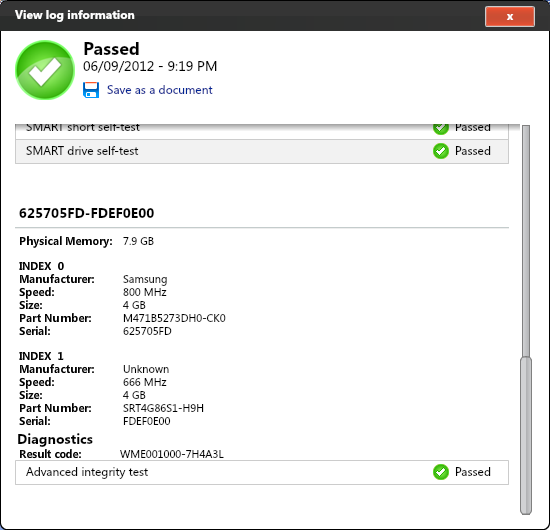
- Lenovo Solution Center - software to test the system. Not sure what it does, but it displays RAM speed (see below)
- Other than these, doesn't come with much bloatware
Dislikes
- Doesn't come with installation CDs. You can burn your own from the software, but I still want installation CDs. At least the DVDs you burn are bootable.
- Has no harddisk indicator light!
- No sleep and charge (charge USB devices while sleeping). I thought this was a common feature, but looks like only computers that advertise it have it.
- The manual doesn't even tell you what the indicator lights mean, let alone having proper indication. Ok the first light seems to be power. It's lit when the computer is on and blinks when sleeping. The second light seems to be battery. It's lit when power is connected (but no indication if charging or full). Actually, it's also lit when power isn't connected. What's it for? The third is caps lock. I know this is a cheap model, but can't they make a proper indication system and use it on all their laptops?

According to Lenovo Solution Center, the original RAM is 800 MHz and the new RAM is 666 MHz. That's not very fast. Hmm I knew the free upgrades would skimp on areas they didn't advertise. I wonder if the new RAM will throttle the old one.
Added 13 July 2012
I tried opening it to replace the DVD drive with another HDD, but I couldn't. Here are some pictures of the insides.
Remember to remove the battery if you're going to open your computer.
The HDD bay. I didn't try moving this.
The DVD drive is quite easy to take out.
The problem was that the power connector for the DVD drive was smaller than for my 2.5" HDD. Seems like SATA has a mini power connector.
Power measurements 23 July 2012
I can't figure out how many W the power adapter is, if I want to buy a spare one. It's quite small, but doesn't seem to say directly how many W it can provide.
- Laptop sleeping, charged - 1 W
- Laptop on - about 16 W